Project Overview :
● Read the image using ocr find the text and write it in the separate .txt file. Here we using easyocr module to read the text from the image. EasyOCR will automatically download the required model files.
● Depending on your hardware, this might take a few seconds to load the model into memory. Once it's finished, you may continue reading photos without having to execute this code again.
● There are various optional parameters we may send here in addition to the list of language code.
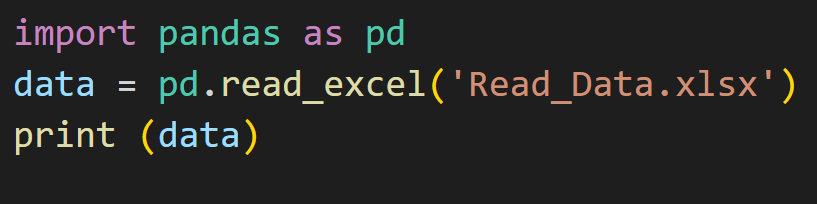
● Take the screenshot of the code as png image, read and write the text from that.
Note: Code and image should be in the same folder.
Requirements :
● Python
● VS code
● Library – easyocr
Input file :
● Input file which we want to read the data.
Code :
import easyocr
f = open('Code.txt', 'w')
reader = easyocr.Reader(['ch_sim','en'], gpu= True)
result = reader. readtext('Image.png', detail=0)
print('Success')
a= result
for i in a:
    print(i)
    f.write(i+"\n")
f.close()
Code Explanation :
● import easyocr -> Import Library
● f = open('Code.txt', 'w') -> Open the text file named 'Code.txt'
● reader = easyocr.Reader(['ch_sim','en'], gpu= True) # need to run only once to load model into memory
● Read the text from the images
● result = reader. readtext('Image.png', detail=0)
● print('Success')
● Get all the result
● a= result
● Write text using for loop.
● for i in a:
● print(i)
● f.write(i+"\n")
● f.close()
● Once write all the data, then close the file.
● Run the code.
Output :
● After running the code, all the texts were read from images,
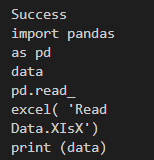
● Also text file was generated in the same folder.👉🏻 Click For TEXT File !!!