OVERVIEW :
● The objective of this project is to develop a robust and user-friendly desktop application for automated Printed Circuit Board (PCB) component detection using the YOLOv8 deep learning model.
● The system aims to enhance quality control in PCB manufacturing by providing real-time and capture-based detection capabilities, enabling precise identification and verification of surface-mount components against predefined board configurations
Steps:
First collect the data for training the model
● Use quality camera
● Collect the data based on the use case of the model, for example lighting , distance

Preparing Dataset:
● Upload the images to Roboflow or use Labelimg library to Annotate the images
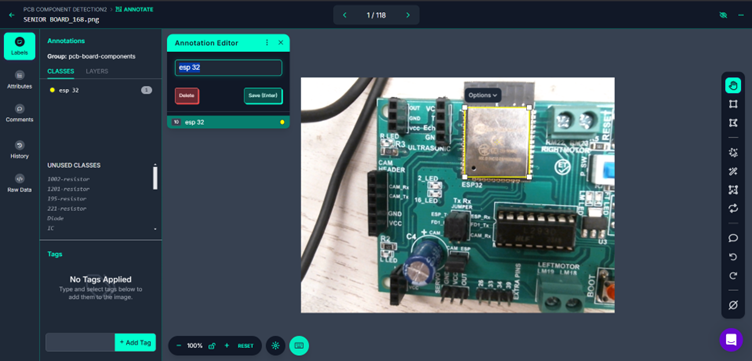
:
● After annotating the images add them to the dataset

:
● Create new version of the dataset

:
● After creating the version generate download code for the dataset and copy it
Picture
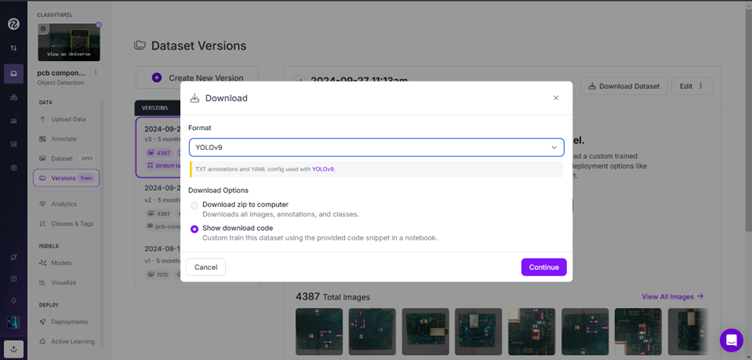
Training the model:
Open Kaggle or Google colab to start training the Model
● Create new notebook in the
● Change the accelerator in the settings to Gpu T4 2
Installation of Dependencies :
● Before you begin, you need to install the necessary dependencies for the project.
Downloading the Dataset from Roboflow :
● We will use Roboflow to access the dataset. You need to initialize the API and download the dataset by providing your Roboflow API key and selecting the specific project.
Importing Required Libraries :
● Now, import the necessary libraries for training and validation. You’ll need to install ultralytics, torch, and yaml, among others.
Checking GPU Availability:
● Before proceeding, check the availability of your GPU to ensure efficient training.
Updating the Data Configuration File (data.yaml):
● We need to update the data.yaml file to ensure that the paths are correct for the training, validation, and test datasets.
Training the YOLO Model :
● Start the training process for your YOLO model. You’ll need to set up the training parameters like the dataset path and specify the number of epochs and devices (GPUs).
Validating the Trained Model :
● Once the model has been trained, validate it by running it on the test/validation dataset to assess its performance.
Evaluating Model Performance:
● Check the performance metrics of the model, such as precision, recall, and mAP (mean average precision), to evaluate how well it performed on the dataset
Download the Best Model Checkpoint:
● To get the best-trained model, download the best.pt checkpoint from the output section. This file contains the best weights of your model after training.
Code File :
Deploying on jetson nano:
● Install Python 3.8
● Create an virtual Environment and install the required libraries
python3 -m venv pcb_env
source pcb_env/bin/activate
● Upgrade the pip and install the packages
pip3 install opencv-python==4.11.0 ultralytics pillow pandas openpyxl
● Install tkinter for the GUI
pip install python3-tk
Steps:
● Create an folder for models inside the project directory and place the model files inside that folder
● Create an new python file inside the project directory with this code
Code :
import cv2
import os
import time
import torch
import tkinter as tk
from tkinter import ttk, messagebox
from PIL import Image, ImageTk
from ultralytics import YOLO
import pandas as pd
import datetime
import json
import random

# Directory where YOLO models are stored
MODEL_DIR = "D:/Krishtec/models/senior board for jetson yolov8n/best.pt"
available_models = [f for f in os.listdir(MODEL_DIR) if f.endswith(".pt")]

# Load predefined component sets from a JSON file if it exists
CONFIG_FILE = "component_sets.json"
if os.path.exists(CONFIG_FILE):
    with open(CONFIG_FILE, "r") as f:
        component_sets = json.load(f)
else:
    component_sets = {
        "Senior Board Front SMD": {"1002-resistor": 2, "1201-resistor": 1, "Resistor 221": 1, "LED": 3, "Ams1117 IC": 1, "esp 32": 1, "195-resistor": 2},
        "Senior Board Back SMD": {"1002-resistor": 2, "221-resistor": 1, "Diode": 2, "Capacitor": 3}
    }

# Global variables
model = None
cap = None
selected_components = {}
label_map = {}
board_counter = 1
real_time_mode = False
dark_theme = False
confidence_threshold = 0.5
real_time_delay = 0.5
last_frame = None
detection_history = []
component_colors = {}
capture_paused = False

# Set up the Tkinter GUI
root = tk.Tk()
root.title("PCB Component Detection")
root.geometry("1400x900")

# Control Frame (Top)
control_frame = tk.LabelFrame(root, text="Controls", font=("Arial", 12, "bold"))
control_frame.pack(side="top", fill="x", padx=10, pady=5)

# Paned Window for Video and Status
paned_window = ttk.PanedWindow(root, orient="horizontal")
paned_window.pack(fill="both", expand=True, padx=10, pady=10)

# Video Frame (Left)
video_frame = tk.Frame(paned_window, bg="black")
paned_window.add(video_frame, weight=3)

# Status Frame (Right)
status_frame = tk.Frame(paned_window)
paned_window.add(status_frame, weight=1)
status_frame.grid_columnconfigure(0, weight=1)
for i in range(9):
    status_frame.grid_rowconfigure(i, weight=1)

# Model Selection
model_var = tk.StringVar(value="Select a Model")

def load_model():
    global model
    selected_model = model_var.get()
    if selected_model == "Select a Model":
        log_message("No model selected.")
        return
    try:
        model_path = os.path.join(MODEL_DIR, selected_model)
        model = YOLO(model_path)
        log_message(f"Loaded model: {selected_model}")
        log_message(f"Model classes: {model.names}")
    except Exception as e:
        log_message(f"Error loading model: {e}")

tk.Label(control_frame, text="Select Model:", font=("Arial", 10)).grid(row=0, column=0, sticky="w", padx=5, pady=2)
model_dropdown = ttk.Combobox(control_frame, textvariable=model_var, values=available_models, state="readonly")
model_dropdown.grid(row=0, column=1, sticky="ew", padx=5, pady=2)
tk.Button(control_frame, text="Load Model", command=load_model).grid(row=0, column=2, padx=5, pady=2)

# Board Type Selection
component_var = tk.StringVar(value="Select Board Type")

def update_selected_components(event):
    global selected_components
    board_type = component_var.get()
    if board_type == "Custom Board":
        start_component_setup()
    else:
        selected_components = component_sets.get(board_type, {})
        if model:
            unmatched = [comp for comp in selected_components.keys() if comp not in model.names and comp not in label_map]
            if unmatched:
                log_message(f"Warning: Components {unmatched} not in model classes {model.names}. Use 'Setup Components' to map.")
        log_message(f"Selected board: {board_type} => {selected_components}")

def start_component_setup():
    if not model:
        log_message("Please load a model first.")
        return
    global cap
    if cap is None:
        cap = cv2.VideoCapture(0)

    setup_window = tk.Toplevel(root)
    setup_window.title("Setup Components")
    setup_window.geometry("1000x700")

    # Video feed frame
    video_frame = tk.LabelFrame(setup_window, text="Camera View", font=("Arial", 12, "bold"), bg="lightgray")
    video_frame.pack(side="left", fill="both", expand=True, padx=10, pady=10)
    setup_video_label = tk.Label(video_frame, bg="black")
    setup_video_label.pack(fill="both", expand=True)

    # Component list frame
    list_frame = tk.LabelFrame(setup_window, text="Component Configuration", font=("Arial", 12, "bold"), bg="lightgray")
    list_frame.pack(side="right", fill="y", padx=10, pady=10, ipadx=5, ipady=5)

    detected_components = {}
    entries = {}
    captured = False
    captured_frame = None
    setup_colors = {}

    def show_setup_preview():
        nonlocal captured
        if captured:
            return
        ret, frame = cap.read()
        if not ret:
            log_message("Failed to grab frame in setup preview.")
            return
        frame_rgb = cv2.cvtColor(frame, cv2.COLOR_BGR2RGB)
        img = Image.fromarray(frame_rgb)
        imgtk = ImageTk.PhotoImage(image=img)
        setup_video_label.imgtk = imgtk
        setup_video_label.config(image=imgtk)
        if setup_window.winfo_exists():
            setup_video_label.after(50, show_setup_preview)

    def capture_setup_frame():
        nonlocal captured, captured_frame
        if captured:
            log_message("Already captured. Press 'Continue' to capture again.")
            return
        ret, frame = cap.read()
        if not ret:
            log_message("Failed to capture frame in setup mode.")
            return
        captured = True
        log_message("Capturing frame and running detection...")
        start_time = time.time()
        try:
            results = model(frame, conf=confidence_threshold)
            inference_time = time.time() - start_time
            captured_frame = detect_setup_components(results, frame.copy(), inference_time)
            if captured_frame is None:
                log_message("Detection returned None. Using original frame.")
                captured_frame = frame.copy()
            frame_rgb = cv2.cvtColor(captured_frame, cv2.COLOR_BGR2RGB)
            img = Image.fromarray(frame_rgb)
            imgtk = ImageTk.PhotoImage(image=img)
            setup_video_label.imgtk = imgtk
            setup_video_label.config(image=imgtk)
            log_message("Detection successful. Bounding boxes drawn.")
            capture_btn.config(state="disabled")
            continue_btn.config(state="normal")
        except Exception as e:
            log_message(f"Detection failed: {e}")
            captured_frame = frame.copy()  # Fallback to original frame
            frame_rgb = cv2.cvtColor(captured_frame, cv2.COLOR_BGR2RGB)
            img = Image.fromarray(frame_rgb)
            imgtk = ImageTk.PhotoImage(image=img)
            setup_video_label.config(image=imgtk)
            capture_btn.config(state="disabled")
            continue_btn.config(state="normal")
            captured = False  # Reset on failure

    def detect_setup_components(results, frame, inference_time):
        nonlocal detected_components, entries, setup_colors
        detected_counts = {}
        if results is None or len(results) == 0:
            log_message("No detection results returned.")
            return frame

        try:
            for r in results:
                if not hasattr(r, 'boxes'):
                    log_message("Results object has no 'boxes' attribute.")
                    return frame
                for box in r.boxes:
                    cls = int(box.cls[0])
                    label = model.names[cls]
                    detected_counts[label] = detected_counts.get(label, 0) + 1
                    if label not in setup_colors:
                        setup_colors[label] = (random.randint(50, 255), random.randint(50, 255), random.randint(50, 255))
                    x1, y1, x2, y2 = map(int, box.xyxy[0])
                    color = setup_colors[label]
                    cv2.rectangle(frame, (x1, y1), (x2, y2), color, 2)
                    cv2.putText(frame, label, (x1, y1 - 10), cv2.FONT_HERSHEY_SIMPLEX, 0.5, color, 2)
        except Exception as e:
            log_message(f"Error processing detection results: {e}")
            return frame

        for label, count in detected_counts.items():
            if label not in entries:
                frame_widget = tk.Frame(list_frame, bg="lightgray")
                frame_widget.pack(fill="x", pady=5)
                tk.Label(frame_widget, text=f"Detected: {label} ({count})", font=("Arial", 10), bg="lightgray").pack(side="left", padx=5)
                name_var = tk.StringVar(value=label)
                qty_var = tk.StringVar(value=str(count))
                tk.Entry(frame_widget, textvariable=name_var, width=20, font=("Arial", 10)).pack(side="left", padx=5)
                tk.Entry(frame_widget, textvariable=qty_var, width=5, font=("Arial", 10)).pack(side="left", padx=5)
                entries[label] = (name_var, qty_var)

        return frame

    def continue_setup():
        nonlocal captured
        captured = False
        capture_btn.config(state="normal")
        continue_btn.config(state="disabled")
        for widget in list_frame.winfo_children():
            if widget not in [board_name_label, board_name_entry, capture_btn, continue_btn, save_btn]:
                widget.destroy()
        entries.clear()
        setup_colors.clear()
        show_setup_preview()

    def save_setup():
        global selected_components
        board_name = board_name_entry.get().strip()
        if not board_name:
            messagebox.showerror("Error", "Please enter a board name.")
            return
        components = {}
        for label, (name_var, qty_var) in entries.items():
            name = name_var.get().strip()
            qty = qty_var.get().strip()
            if name and qty.isdigit():
                components[name] = int(qty)
                if name != label:
                    label_map[name] = label
        if not components:
            messagebox.showerror("Error", "No valid components defined.")
            return
        component_sets[board_name] = components
        selected_components = components
        save_component_sets()
        board_dropdown["values"] = list(component_sets.keys()) + ["Custom Board"]
        log_message(f"Saved/Updated board '{board_name}': {components}")
        setup_window.destroy()

    board_name_label = tk.Label(list_frame, text="Board Name:", font=("Arial", 10, "bold"), bg="lightgray")
    board_name_label.pack(pady=5)
    board_name_entry = tk.Entry(list_frame, font=("Arial", 10))
    board_name_entry.pack(pady=5)

    capture_btn = tk.Button(list_frame, text="Capture", command=capture_setup_frame, font=("Arial", 10))
    capture_btn.pack(pady=5)
    continue_btn = tk.Button(list_frame, text="Continue", command=continue_setup, state="disabled", font=("Arial", 10))
    continue_btn.pack(pady=5)
    save_btn = tk.Button(list_frame, text="Save", command=save_setup, font=("Arial", 10, "bold"), bg="#4CAF50", fg="white")
    save_btn.pack(pady=10)

    show_setup_preview()

def edit_component_set():
    global selected_components
    board_type = component_var.get()
    if board_type == "Select Board Type" or board_type == "Custom Board":
        log_message("Please select a valid board type to edit.")
        return

    edit_window = tk.Toplevel(root)
    edit_window.title(f"Edit Component Set: {board_type}")
    edit_window.geometry("400x500")

    canvas = tk.Canvas(edit_window)
    scrollbar = tk.Scrollbar(edit_window, orient="vertical", command=canvas.yview)
    scrollable_frame = tk.Frame(canvas)

    scrollable_frame.bind("<Configure>", lambda e: canvas.configure(scrollregion=canvas.bbox("all")))
    canvas.create_window((0, 0), window=scrollable_frame, anchor="nw")
    canvas.configure(yscrollcommand=scrollbar.set)

    canvas.pack(side="left", fill="both", expand=True)
    scrollbar.pack(side="right", fill="y")

    tk.Label(scrollable_frame, text="Component Name", font=("Arial", 10, "bold")).grid(row=0, column=0, padx=5, pady=5)
    tk.Label(scrollable_frame, text="Quantity", font=("Arial", 10, "bold")).grid(row=0, column=1, padx=5, pady=5)
    tk.Label(scrollable_frame, text="Remove", font=("Arial", 10, "bold")).grid(row=0, column=2, padx=5, pady=5)

    entries = []
    current_components = component_sets.get(board_type, {})
    for i, (comp, qty) in enumerate(current_components.items()):
        name_entry = tk.Entry(scrollable_frame, font=("Arial", 10))
        name_entry.insert(0, comp)
        qty_entry = tk.Entry(scrollable_frame, width=5, font=("Arial", 10))
        qty_entry.insert(0, qty)
        remove_btn = tk.Button(scrollable_frame, text="X", command=lambda r=i: [entries.pop(r), remove_btn.grid_forget(), name_entry.grid_forget(), qty_entry.grid_forget()])
        name_entry.grid(row=i+1, column=0, padx=5, pady=2)
        qty_entry.grid(row=i+1, column=1, padx=5, pady=2)
        remove_btn.grid(row=i+1, column=2, padx=5, pady=2)
        entries.append((name_entry, qty_entry))

    def add_component_row():
        row = len(entries) + 1
        name_entry = tk.Entry(scrollable_frame, font=("Arial", 10))
        qty_entry = tk.Entry(scrollable_frame, width=5, font=("Arial", 10))
        remove_btn = tk.Button(scrollable_frame, text="X", command=lambda: [entries.remove((name_entry, qty_entry)), remove_btn.grid_forget(), name_entry.grid_forget(), qty_entry.grid_forget()])
        name_entry.grid(row=row, column=0, padx=5, pady=2)
        qty_entry.grid(row=row, column=1, padx=5, pady=2)
        remove_btn.grid(row=row, column=2, padx=5, pady=2)
        entries.append((name_entry, qty_entry))
        canvas.update_idletasks()
        canvas.configure(scrollregion=canvas.bbox("all"))

    btn_frame = tk.Frame(edit_window)
    btn_frame.pack(side="bottom", fill="x", pady=5)

    tk.Button(btn_frame, text="Add Component", command=add_component_row, font=("Arial", 10)).pack(side="left", padx=5)

    def save_edit():
        global selected_components
        components = {}
        for name_entry, qty_entry in entries:
            name = name_entry.get().strip()
            qty = qty_entry.get().strip()
            if name and qty.isdigit():
                components[name] = int(qty)
        if not components:
            messagebox.showerror("Error", "Please define at least one component.")
            return
        old_components = set(component_sets[board_type].keys())
        new_components = set(components.keys())
        deleted_components = old_components - new_components
        for comp in deleted_components:
            if comp in label_map:
                log_message(f"Removing mapping for deleted component: {comp} -> {label_map[comp]}")
                del label_map[comp]
        component_sets[board_type] = components
        selected_components = components
        save_component_sets()
        board_dropdown["values"] = list(component_sets.keys()) + ["Custom Board"]
        log_message(f"Updated set '{board_type}': {components}")
        log_message(f"Current label_map: {label_map}")
        edit_window.destroy()

    tk.Button(btn_frame, text="Save Changes", command=save_edit, font=("Arial", 10, "bold"), bg="#4CAF50", fg="white").pack(side="left", padx=5)

def save_component_sets():
    try:
        with open(CONFIG_FILE, "w") as f:
            json.dump(component_sets, f, indent=4)
        log_message(f"Component sets saved to {CONFIG_FILE}")
    except Exception as e:
        log_message(f"Error saving component sets: {e}")

tk.Label(control_frame, text="Select Board Type:", font=("Arial", 10)).grid(row=1, column=0, sticky="w", padx=5, pady=2)
board_dropdown = ttk.Combobox(control_frame, textvariable=component_var, values=list(component_sets.keys()) + ["Custom Board"], state="readonly")
board_dropdown.grid(row=1, column=1, sticky="ew", padx=5, pady=2)
board_dropdown.bind("<<ComboboxSelected>>", update_selected_components)
tk.Button(control_frame, text="Edit Set", command=edit_component_set).grid(row=1, column=2, padx=5, pady=2)
tk.Button(control_frame, text="Setup Components", command=start_component_setup).grid(row=1, column=3, padx=5, pady=2)

# Confidence Threshold Slider
def update_confidence(val):
    global confidence_threshold
    confidence_threshold = float(val)
    log_message(f"Confidence threshold set to {confidence_threshold:.2f}")

tk.Label(control_frame, text="Confidence Threshold:", font=("Arial", 10)).grid(row=2, column=0, sticky="w", padx=5, pady=2)
confidence_slider = tk.Scale(control_frame, from_=0.1, to=1.0, resolution=0.05, orient="horizontal", command=update_confidence)
confidence_slider.set(0.5)
confidence_slider.grid(row=2, column=1, sticky="ew", padx=5, pady=2)

# Real-Time Delay Slider
def update_delay(val):
    global real_time_delay
    real_time_delay = float(val)
    log_message(f"Real-time delay set to {real_time_delay:.2f}s")

tk.Label(control_frame, text="Real-time Delay (s):", font=("Arial", 10)).grid(row=3, column=0, sticky="w", padx=5, pady=2)
delay_slider = tk.Scale(control_frame, from_=0.1, to=2.0, resolution=0.1, orient="horizontal", command=update_delay)
delay_slider.set(0.5)
delay_slider.grid(row=3, column=1, sticky="ew", padx=5, pady=2)

# Mode Buttons
def start_realtime():
    global cap, real_time_mode, capture_paused
    if model is None or not selected_components:
        log_message("Please load a model and select a board type.")
        return
    real_time_mode = True
    capture_paused = False
    if cap is None:
        cap = cv2.VideoCapture(0)
    log_message("Started Real-time Detection mode.")
    start_realtime_btn.config(state="disabled")
    stop_realtime_btn.config(state="normal")
    capture_btn.config(state="disabled")
    export_btn.config(state="normal")
    zoom_in_btn.config(state="disabled")
    zoom_out_btn.config(state="disabled")
    continue_btn.config(state="disabled")
    model_dropdown.config(state="disabled")
    board_dropdown.config(state="disabled")
    mode_label.config(text="Mode: Real-time")
    detect_realtime()

def stop_realtime():
    global cap, real_time_mode, last_frame, capture_paused
    real_time_mode = False
    capture_paused = False
    if cap:
        cap.release()
        cap = None
    last_frame = None
    video_label.config(image="")
    log_message("Stopped Real-time Detection. Switched to Capture mode.")
    start_realtime_btn.config(state="normal")
    stop_realtime_btn.config(state="disabled")
    capture_btn.config(state="normal")
    export_btn.config(state="disabled")
    zoom_in_btn.config(state="disabled")
    zoom_out_btn.config(state="disabled")
    continue_btn.config(state="disabled")
    model_dropdown.config(state="readonly")
    board_dropdown.config(state="readonly")
    mode_label.config(text="Mode: Capture")
    show_preview()

def capture_and_detect():
    global board_counter, model, cap, last_frame, capture_paused
    if model is None or not selected_components:
        log_message("Please load a model and select a board type.")
        return
    if cap is None:
        cap = cv2.VideoCapture(0)
    ret, frame = cap.read()
    if not ret:
        log_message("Failed to capture image.")
        return
    start_time = time.time()
    results = model(frame, conf=confidence_threshold)
    inference_time = time.time() - start_time
    last_frame = detect_and_display(results, frame, inference_time, saving_enabled=True)
    capture_paused = True
    log_message("Image captured. Press 'Continue' to resume preview.")
    capture_btn.config(state="disabled")
    export_btn.config(state="normal")
    zoom_in_btn.config(state="normal")
    zoom_out_btn.config(state="normal")
    continue_btn.config(state="normal")
    update_zoomed_display()

def continue_preview():
    global capture_paused
    capture_paused = False
    capture_btn.config(state="normal")
    export_btn.config(state="disabled")
    zoom_in_btn.config(state="disabled")
    zoom_out_btn.config(state="disabled")
    continue_btn.config(state="disabled")
    show_preview()

def export_snapshot():
    global last_frame
    if last_frame is None:
        log_message("No frame available to export.")
        return
    filename = f"snapshot_{datetime.datetime.now().strftime('%Y%m%d_%H%M%S')}.jpg"
    cv2.imwrite(filename, last_frame)
    log_message(f"Snapshot saved as {filename}")

zoom_level = 1.0
def zoom_in():
    global zoom_level, last_frame
    if last_frame is None:
        return
    zoom_level = min(zoom_level + 0.2, 3.0)
    update_zoomed_display()

def zoom_out():
    global zoom_level, last_frame
    if last_frame is None:
        return
    zoom_level = max(zoom_level - 0.2, 0.5)
    update_zoomed_display()

def update_zoomed_display():
    global last_frame
    if last_frame is None:
        return
    h, w = last_frame.shape[:2]
    new_h, new_w = int(h * zoom_level), int(w * zoom_level)
    zoomed_frame = cv2.resize(last_frame, (new_w, new_h), interpolation=cv2.INTER_LINEAR)
    frame_rgb = cv2.cvtColor(zoomed_frame, cv2.COLOR_BGR2RGB)
    img = Image.fromarray(frame_rgb)
    imgtk = ImageTk.PhotoImage(image=img)
    video_label.imgtk = imgtk
    video_label.config(image=imgtk)

start_realtime_btn = tk.Button(control_frame, text="Start Real-time", command=start_realtime, font=("Arial", 10))
start_realtime_btn.grid(row=4, column=0, padx=5, pady=5)
stop_realtime_btn = tk.Button(control_frame, text="Stop Real-time", command=stop_realtime, state="disabled", font=("Arial", 10))
stop_realtime_btn.grid(row=4, column=1, padx=5, pady=5)
capture_btn = tk.Button(control_frame, text="Capture Image", command=capture_and_detect, font=("Arial", 10))
capture_btn.grid(row=4, column=2, padx=5, pady=5)
export_btn = tk.Button(control_frame, text="Export Snapshot", command=export_snapshot, state="disabled", font=("Arial", 10))
export_btn.grid(row=4, column=3, padx=5, pady=5)
zoom_in_btn = tk.Button(control_frame, text="Zoom In", command=zoom_in, state="disabled", font=("Arial", 10))
zoom_in_btn.grid(row=4, column=4, padx=5, pady=5)
zoom_out_btn = tk.Button(control_frame, text="Zoom Out", command=zoom_out, state="disabled", font=("Arial", 10))
zoom_out_btn.grid(row=4, column=5, padx=5, pady=5)
continue_btn = tk.Button(control_frame, text="Continue", command=continue_preview, state="disabled", font=("Arial", 10))
continue_btn.grid(row=4, column=6, padx=5, pady=5)

# Theme Toggle
def apply_theme():
    global dark_theme
    dark_theme = not dark_theme
    bg_color = "#333333" if dark_theme else "Lightgrey"
    fg_color = "white" if dark_theme else "black"
    frame_bg = "#444444" if dark_theme else "Lightgrey"
    console_bg = "#555555" if dark_theme else "white"

    root.config(bg=bg_color)
    control_frame.config(bg=bg_color, fg=fg_color)
    video_frame.config(bg=frame_bg)
    status_frame.config(bg=frame_bg)
    mode_label.config(bg=frame_bg, fg=fg_color)
    summary_label.config(bg=frame_bg, fg=fg_color)
    missing_tree.config(style="Dark.Treeview" if dark_theme else "Treeview")
    board_number_label.config(bg=frame_bg, fg="blue")
    fps_label.config(bg=frame_bg, fg=fg_color)
    history_label.config(bg=frame_bg, fg=fg_color)
    status_console.config(bg=console_bg, fg=fg_color)
    toggle_theme_btn.config(text="Light Theme" if dark_theme else "Dark Theme")

toggle_theme_btn = tk.Button(control_frame, text="Dark Theme", command=apply_theme, font=("Arial", 10))
toggle_theme_btn.grid(row=5, column=0, columnspan=7, pady=5)

control_frame.grid_columnconfigure(1, weight=1)

# Video Label
video_label = tk.Label(video_frame)
video_label.pack(fill="both", expand=True)

# Status Frame Components
mode_label = tk.Label(status_frame, text="Mode: Capture", font=("Arial", 12))
mode_label.grid(row=0, column=0, sticky="w", pady=5)

summary_label = tk.Label(status_frame, text="Component Summary: N/A", font=("Arial", 12))
summary_label.grid(row=1, column=0, sticky="w", pady=5)

tk.Label(status_frame, text="Missing/Incorrect Components", font=("Arial", 14, "bold")).grid(row=2, column=0, sticky="w")
missing_tree = ttk.Treeview(status_frame, columns=("Icon", "Component", "Expected", "Detected"), show="headings", height=8)
missing_tree.heading("Icon", text="")
missing_tree.heading("Component", text="Component")
missing_tree.heading("Expected", text="Expected")
missing_tree.heading("Detected", text="Detected")
missing_tree.column("Icon", width=30)
missing_tree.column("Component", width=150)
missing_tree.column("Expected", width=50)
missing_tree.column("Detected", width=50)
missing_tree.grid(row=3, column=0, sticky="nsew", pady=5)

board_number_label = tk.Label(status_frame, text="Board Number: N/A", font=("Arial", 12, "bold"), fg="blue")
board_number_label.grid(row=4, column=0, sticky="w", pady=5)
fps_label = tk.Label(status_frame, text="FPS: --", font=("Arial", 12))
fps_label.grid(row=5, column=0, sticky="w")

tk.Label(status_frame, text="Detection History", font=("Arial", 14, "bold")).grid(row=6, column=0, sticky="w")
history_label = tk.Text(status_frame, height=5, state="disabled")
history_label.grid(row=7, column=0, sticky="nsew", pady=5)

console_frame = tk.Frame(status_frame)
console_frame.grid(row=8, column=0, sticky="nsew", pady=5)
scrollbar = tk.Scrollbar(console_frame)
scrollbar.pack(side="right", fill="y")
status_console = tk.Text(console_frame, width=40, height=8, yscrollcommand=scrollbar.set, state="disabled")
status_console.pack(side="left", fill="both", expand=True)
scrollbar.config(command=status_console.yview)

# Utility Functions
def log_message(msg):
    timestamp = datetime.datetime.now().strftime("%H:%M:%S")
    status_console.config(state="normal")
    status_console.insert(tk.END, f"[{timestamp}] {msg}\n")
    status_console.see(tk.END)
    status_console.config(state="disabled")

def show_preview():
    if real_time_mode or model is None or capture_paused:
        return
    global cap
    if cap is None:
        cap = cv2.VideoCapture(0)
    ret, frame = cap.read()
    if ret:
        frame_rgb = cv2.cvtColor(frame, cv2.COLOR_BGR2RGB)
        img = Image.fromarray(frame_rgb)
        imgtk = ImageTk.PhotoImage(image=img)
        video_label.imgtk = imgtk
        video_label.config(image=imgtk)
    video_label.after(50, show_preview)

def detect_realtime():
    global cap, model, last_frame
    if not real_time_mode or cap is None or model is None:
        return
    ret, frame = cap.read()
    if not ret:
        log_message("Failed to grab frame.")
        return
    start_time = time.time()
    results = model(frame, conf=confidence_threshold)
    inference_time = time.time() - start_time
    last_frame = detect_and_display(results, frame, inference_time, saving_enabled=False)
    video_label.after(int(real_time_delay * 1000), detect_realtime)

def detect_and_display(results, frame, inference_time, saving_enabled=True):
    global board_counter, selected_components, detection_history
    detected_counts = {}

    for comp in selected_components.keys():
        if comp not in component_colors:
            component_colors[comp] = (random.randint(50, 255), random.randint(50, 255), random.randint(50, 255))

    valid_components = set(selected_components.keys())
    valid_labels = set(label_map.values()) & set(model.names)
    for r in results:
        for box in r.boxes:
            cls = int(box.cls[0])
            label = model.names[cls]
            mapped_label = next((comp for comp, mapped in label_map.items() if mapped == label), label)
            if mapped_label in valid_components:
                detected_counts[mapped_label] = detected_counts.get(mapped_label, 0) + 1
                x1, y1, x2, y2 = map(int, box.xyxy[0])
                conf = box.conf[0]
                display_label = f"{mapped_label} ({conf:.2f})"
                color = component_colors.get(mapped_label, (0, 255, 0))
                cv2.rectangle(frame, (x1, y1), (x2, y2), color, 2)
                cv2.putText(frame, display_label, (x1, y1 - 10), cv2.FONT_HERSHEY_SIMPLEX, 0.5, color, 2)

    missing_tree.delete(*missing_tree.get_children())
    summary_text = "Component Summary: "
    all_correct = True
    for comp, expected in selected_components.items():
        detected = detected_counts.get(comp, 0)
        if detected == expected:
            missing_tree.insert("", "end", values=("", comp, expected, detected), tags=("correct",))
        else:
            all_correct = False
            missing_tree.insert("", "end", values=("❌", comp, expected, detected), tags=("incorrect",))
        summary_text += f"{comp}: {detected}/{expected}, "
    if all_correct:
        missing_tree.insert("", "end", values=("", "All components correct ✅", "", ""), tags=("all_correct",))
    missing_tree.tag_configure("correct", foreground="green")
    missing_tree.tag_configure("incorrect", foreground="red")
    missing_tree.tag_configure("all_correct", foreground="green")
    summary_label.config(text=summary_text.rstrip(", "))

    if real_time_mode:
        board_number_label.config(text="Real-time Mode")
    else:
        board_number = f"Board {board_counter}"
        board_number_label.config(text=f"Board Number: {board_number}")
        if saving_enabled:
            save_results_to_excel(detected_counts, selected_components, board_number)
            detection_history.append(f"{board_number}: {summary_text.rstrip(', ')}")
            if len(detection_history) > 5:
                detection_history.pop(0)
            history_label.config(state="normal")
            history_label.delete(1.0, tk.END)
            history_label.insert(tk.END, "\n".join(detection_history))
            history_label.config(state="disabled")
            board_counter += 1

    fps = 1.0 / inference_time if inference_time > 0 else 0
    fps_label.config(text=f"FPS: {fps:.2f}")

    return frame

def save_results_to_excel(detected, expected, board_number):
    file_path = "detection_results.xlsx"
    detected_str = ", ".join([f"{k}: {v}" for k, v in detected.items()])
    expected_str = ", ".join([f"{k}: {v}" for k, v in expected.items()])
    missing = {k: v - detected.get(k, 0) for k, v in expected.items() if v > detected.get(k, 0)}
    data = {
        "Board Number": [board_number],
        "Detected Components": [detected_str],
        "Expected Components": [expected_str],
        "Missing/Incorrect": [", ".join([f"{k}: {v}" for k, v in missing.items()])] if missing else ["None"]
    }
    df = pd.DataFrame(data)
    if os.path.exists(file_path):
        existing_df = pd.read_excel(file_path)
        df = pd.concat([existing_df, df], ignore_index=True)
    df.to_excel(file_path, index=False)

# Start the preview and run the main loop
show_preview()
root.mainloop()

# Cleanup
if cap:
    cap.release()
cv2.destroyAllWindows()
● Open the Terminal and redirect to the project directory where the GUI script is located and run the python script

● On successful run you can see the output as

Steps to use GUI:
● Select and model load the model
● Choose the board types it will load the set of components for that board
● Use the setup components wizard to check the model classes that its trained with
● Press capture image to initialize camera and capture image and run detection on that image
● The results will be shown like below
