Overview :
● This project implements real-time lane and vehicle detection using the YOLOv8 model and OpenCV.
● It processes video frames from a live camera feed to detect lanes using edge detection and the Hough transform while simultaneously detecting vehicles and estimating their distance using YOLOv8.
Features :
● Real-time lane detection using edge detection and Hough Line Transform.
● Real-time vehicle detection using YOLOv8.
● Distance estimation of detected vehicles.
● Live video feed processing and display of detected lanes and vehicles.
Driver Requirement :
● Ensure you have the following dependencies installed:
● pip install opencv-python numpy ultralytics
● YOLOv8 weights file: lane-detection/weights/yolov8n.pt
Installation & Setup :
● Clone the repository or copy the script.
● Install the required dependencies.
● Place the required YOLO model weights in the specified directory.
● Run the script: python lane_vehicle_detection.py
Configuration :
The following parameters can be adjusted based on camera calibration and input data:
● KNOWN_WIDTH: Approximate width of a car in meters.
● FOCAL_LENGTH: Estimated focal length of the camera.
● VEHICLE_CLASSES: List of vehicle classes to detect.
How It Works :
1. Lane Detection
● Converts the frame to grayscale.
● Applies Gaussian blur.
● Uses Canny edge detection.
● Masks the region of interest.
● Detects lanes using the Hough Line Transform.
2. Vehicle Detection & Distance Estimation
● Uses YOLOv8 for real-time vehicle detection.
● Estimates distance using the formula:
● Annotates frames with bounding boxes and distance labels.
3. Real-Time Video Processing
● Captures video from the webcam.
● Processes each frame and displays it in real-time.
● Press 'q' to exit the application.
Output :
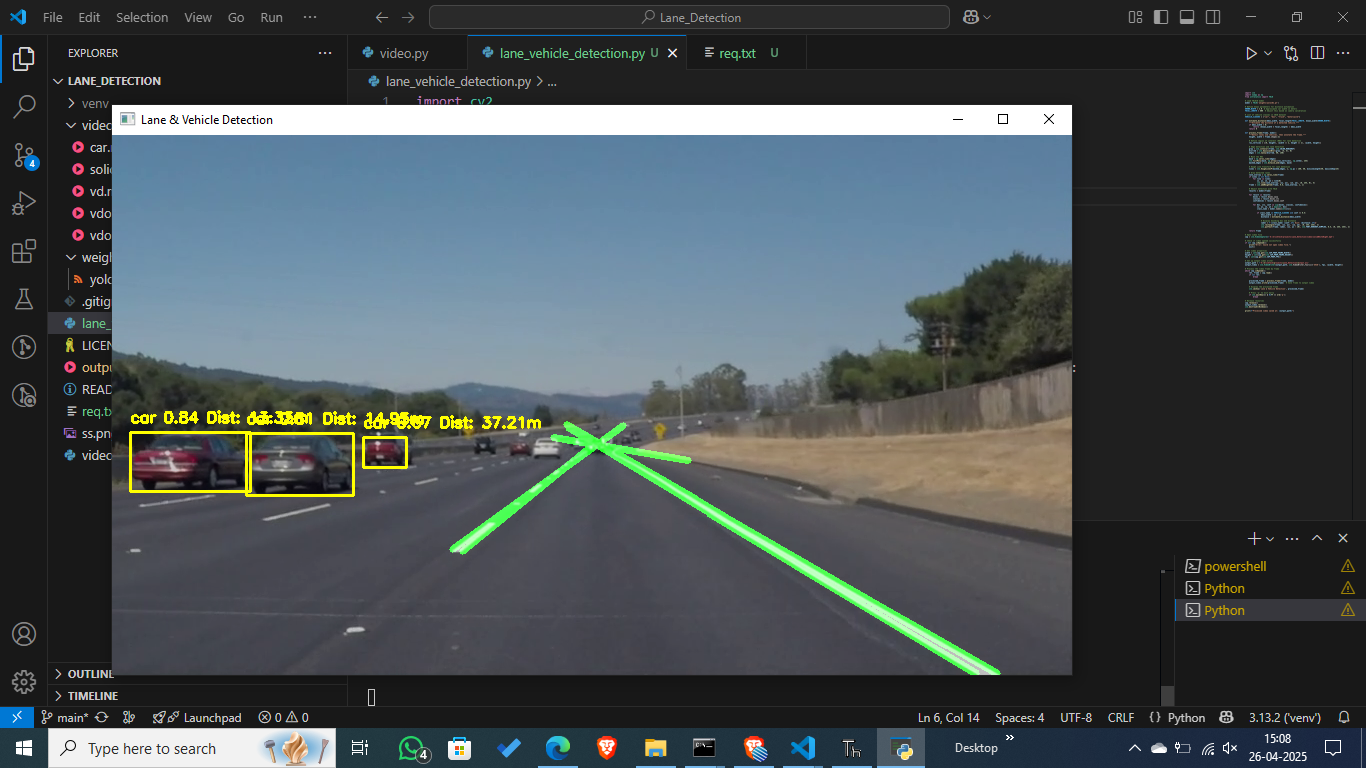
The processed video stream displays:
● Detected lanes highlighted in green.
● Detected vehicles annotated with their class, confidence score, and estimated distance.
Project Files :
● Script file:
lane_vehicle_detection.py
● Model File:
yolov8s.pt file
● Requirements File:
req.txt
Running the Real-Time Detection :
● To start real-time detection, execute: python lane_vehicle_detection.py
● This will open a live camera feed and display the detected lanes and vehicles in real-time. Press
'q' to exit.