Project Overview :
● Publish messages using the Paho Python MQTT client. Based on the publish/subscribe model, MQTT is a kind of lightweight IoT messaging protocol that can deliver real-time and dependable messaging service for IoT devices while utilizing very little code and bandwidth.
● It is appropriate for hardware-constrained devices and a network environment with constrained bandwidth.
● MQTT protocol is therefore widely used in the IoT, mobile internet, Internet of Things, electricity, and other industries.
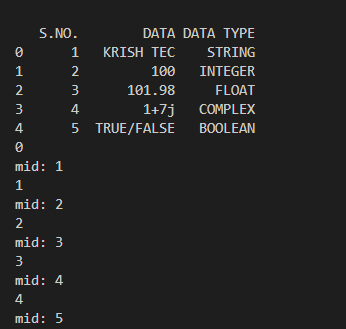
● Publish module provides some helper functions to allow straightforward publishing of messages in a one-shot manner. Read the excel file using pandas then publish the data.
● An MQTT client can publish data as soon as it connects to a broker.
Requirements :
● Python
● VS code
● Library
● Input file - Read_Data.xlsx
Input file :
● Input file which we want to read the data. 👉🏻 Click For Data File !!!
Code :
import numpy as np
import matplotlib.pyplot as plt
import pandas as pd
import paho.mqtt.client as paho
import time
import json

df_1= pd.read_excel('Read_Data.xlsx')
print(df_1)
df_1=df_1.fillna('')
df_x=df_1['DATA'].to_list()
def on_publish(client, userdata, mid):
    print("mid: "+str(mid))
client = paho.Client()
client.on_publish = on_publish
client.connect("broker.hivemq.com", 1883)
client.loop_start()
for i in range(len(df_x)):
  print(i)
  x2 = {'node':9, 'pin':7,'value': df_x[i]}
  x2 = json.dumps(x2)
  y2 = json.loads(x2)
  client.publish("kt-datavim/9", x2)

  time.sleep(1)
client.disconnect()
client.loop_stop()
Code Explanation :
● import numpy as np
● import matplotlib.pyplot as plt
● import pandas as pd
● import paho.mqtt.client as paho
● import time
● import json
● Import the above mentioned all libraries.
● df_1= pd.read_excel('Read_Data.xlsx')
● print(df_1)
● df_1=df_1.fillna('')
● df_x=df_1['DATA'].to_list()
● Read the data from the excel and print it then assign the which message we want publish in MQTT, convert those messages to list.
● def on_publish(client, userdata, mid):
● print("mid: "+str(mid))
● client = paho.Client()
● client.on_publish = on_publish
● client.connect("broker.hivemq.com", 1883)
● The on_publish callback function must receive three parameters. paho.Client(), it publishing messages to an MQTT server very straightforward. Set the MQTT Broker address, and port.
● client.loop_start() -> Start loop*() functions to maintain network traffic flow with the broker.
● for i in range(len(df_x)):
● print(i)
● x2 = {'node':9, 'pin':7,'value': df_x[i]}
● x2 = json.dumps(x2)
● y2 = json.loads(x2)
● client.publish("kt-datavim/9", x2)
● time.sleep(1)
● client.disconnect()
● client.loop_stop()
● json.loads() takes in a string and returns a json object. json.dumps() takes in a json object and returns a string.
● Publish the messages under the topic "kt-datavim/9"”. Once publish was done disconnect the connection and stop the loop.
● Run the code.
Output :
● After running the code, messages start publishing,